 7844a71386
Bumps [flask](https://github.com/pallets/flask) from 2.1.2 to 2.3.2.
- [Release notes](https://github.com/pallets/flask/releases)
- [Changelog](https://github.com/pallets/flask/blob/main/CHANGES.rst)
- [Commits](https://github.com/pallets/flask/compare/2.1.2...2.3.2)

---
updated-dependencies:
- dependency-name: flask
  dependency-type: direct:production
...

Signed-off-by: dependabot[bot] <support@github.com>
Real-time object detection application
Web application for real-time object detection on video streaming via web browser.
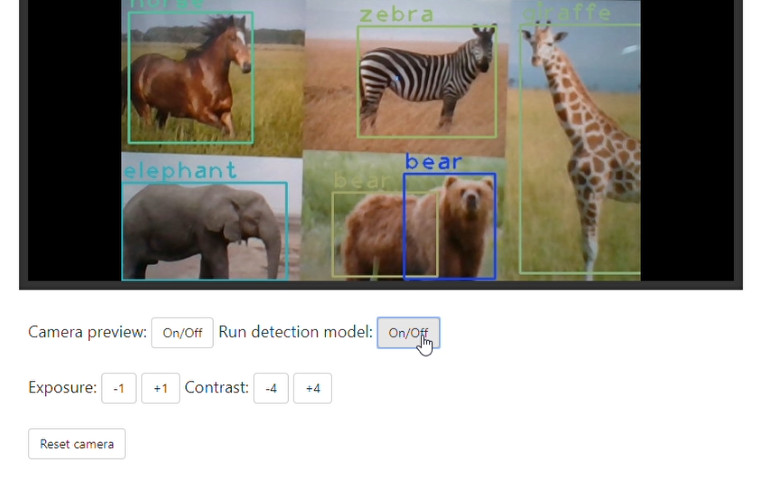
Watch the demo video.
Installation
Create and activate an virtual environment, as follows:
$ cd cloned/directory/
$ python -m venv env
$ env/Scripts/activate
After have installed and activated the environment, install all the dependencies:
$ pip install -r requirements.txt
After that, you can run the following command and access the application at 127.0.0.1:5000 on your browser.
$ python application.py
obs.: This application was tested only on Google Chrome.
Download model
To download the yolov3.weights, just run:
$ cd models/
$ python dl-weights.py
Usage
- Camera preview: Enables and disables the webcam preview.
- Run detection model: Enables and disables the detection model.
- Exposure: Buttons which increase or decrease camera exposure stops by 1.
- Contrast: Buttons which increase or decrease camera contrast stops by 4.
- Reset camera: Reset all camera settings based on camera_settings.log file.